CVE-2026-85706: One HTTP Request Reads Your GitLab Secrets
If your team runs a self-hosted GitLab instance, patch it today. CVE-2026-85706 is a CVSS 10.0 path traversal in GitLab's repository commits API that requires no authentication, no credentials, and no prior foothold. A single crafted HTTP POST is all it takes. GitLab published the fix on September 10; CISA added the flaw to its Known Exploited Vulnerabilities catalog on September 11; public proof-of-concept code appeared the same day. The CISA remediation deadline for federal agencies is today, September 14. If you're still on a vulnerable build, you are operating on borrowed time.
How the path traversal reads server files
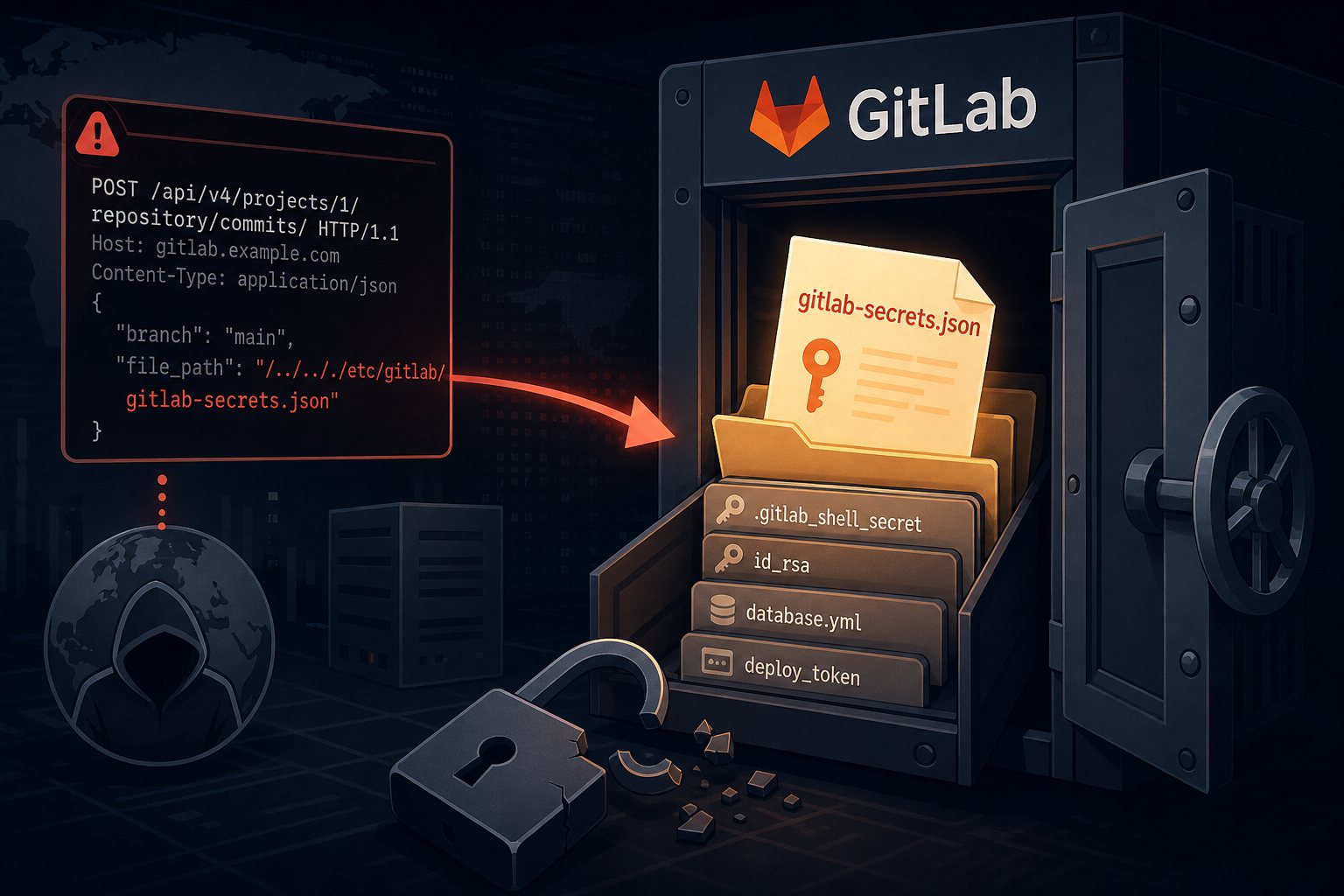
GitLab's repository commits API endpoint (POST /api/v4/projects/{id}/repository/commits/) failed to properly confine path inputs in one code path and did not enforce authentication before returning file contents. An attacker who includes path traversal sequences (../../../) in the file.path parameter can instruct GitLab to retrieve any file readable by the git system user on the server, entirely outside the git repository the request nominally targets. No session token. No OAuth flow. No brute-force required.
The most valuable files usually sit alongside a GitLab installation rather than in the source code. The /etc/gitlab/gitlab-secrets.json file stores the encryption keys for every CI/CD variable in the database. Read that file and you can decrypt every secret your pipelines have ever stored: cloud provider access keys, container registry credentials, Kubernetes configs, payment-processor API tokens, database passwords. Beyond secrets.json, the same request can retrieve .gitlab_shell_secret, SSH host keys, deploy tokens, and database.yml. The git repository is a door; this flaw hands attackers the entire keyring for the building.
Affected versions
CVE-2026-85706 affects GitLab Community Edition and Enterprise Edition in these ranges:
- Version 18.7 through 19.1.7 (inclusive)
- Version 19.2.0 through 19.2.5 (inclusive)
- Version 19.3.0 through 19.3.1 (inclusive)
Fixed releases are 19.1.8, 19.2.6, and 19.3.2. All self-managed deployment types are affected: Omnibus packages, source installs, and Helm chart deployments. GitLab.com (the SaaS product) was patched before disclosure. GitLab Dedicated customers do not need to take action.
To find your current version:
sudo gitlab-rake gitlab:version_infoOr from the web UI: Admin Area → Dashboard → Components. If you're anywhere in the affected ranges above, treat your instance as compromised until you've patched and rotated secrets.
Why exploitation moved so fast
Two factors collapsed the usual attacker lag between advisory and mass exploitation. First, the technical barrier is close to zero. Path traversal via a POST parameter is a well-understood technique. The mechanics here required no novel research, just knowledge of GitLab's file layout, which is public documentation. Public PoC repositories appeared on GitHub within hours of the advisory, meaning automated scanning tools were updated almost immediately.
Second, self-hosted GitLab instances are high-value, low-visibility targets. They're developer infrastructure, often inside a network perimeter but exposed on a routable IP for remote access. They aggregate more operational secrets than almost any other system in a technology organization, precisely because CI/CD pipelines need credentials to do their work. Attackers who successfully read a secrets file can pivot into cloud accounts, production databases, or container infrastructure without touching GitLab again. The instance is the map; the credentials are the treasure.
Patching and recovery steps
Patch first. For Omnibus package installations:
sudo apt-get update && sudo apt-get install gitlab-ee
# or for CE:
sudo apt-get install gitlab-ce
Confirm the result with sudo gitlab-rake gitlab:version_info before anything else.
If you cannot patch within the next few hours, an interim control is to block external access to /api/v4/projects/*/repository/commits at your reverse proxy or load balancer while you prepare a maintenance window. This breaks legitimate commit API usage, so weigh that against the exposure.
After patching, assume your secrets were read and rotate accordingly:
- Rotate GitLab's own secrets: Back up and regenerate
/etc/gitlab/gitlab-secrets.json, then runsudo gitlab-ctl reconfigure. This invalidates the encryption keys for stored CI/CD variables, so you will need to re-enter them. Do it anyway. Any secrets an attacker read before the patch are now useless to them. - Rotate CI/CD variables: Audit every variable stored in your GitLab pipelines. Rotate cloud provider credentials, API keys, and database passwords. Treat any secret that existed in a pipeline before September 10 as potentially compromised.
- Rotate deploy tokens and SSH keys: Regenerate server SSH host keys and revoke then reissue any deploy tokens associated with the instance.
- Review your logs: Look for unexpected POST requests to
/api/v4/projects/going back to September 10. Automated scanners typically leave distinctive path traversal sequences in the request parameters. Rapid7 and watchTowr have both published detection guidance specific to this CVE.
Earlier attacks on developer infrastructure
CVE-2026-85706 follows the same arc as the JFrog Artifactory authentication bypass from two weeks ago and the Gitea hook injection from August: developer infrastructure patched on a slower cycle than it deserves, holding credentials that unlock production systems, with exploitation landing before most organizations had finished reading the advisory. Source-control and build systems have become a primary attack surface because they sit at the intersection of broad network access and concentrated secrets. They deserve the same patching urgency as your web servers and firewalls.
At Falcon Internet, anomalous API traffic against internal developer tools is exactly what 24x7x365 NOC monitoring is built to catch: the kind of request that looks structurally normal until you notice the path parameter is asking for /etc/passwd instead of a file in the repository.
If you're running self-hosted GitLab, the two numbers that matter right now are your current version and the hours since you last updated it.