Synology NAS units on outdated DSM hit by C3RB3R ransomware
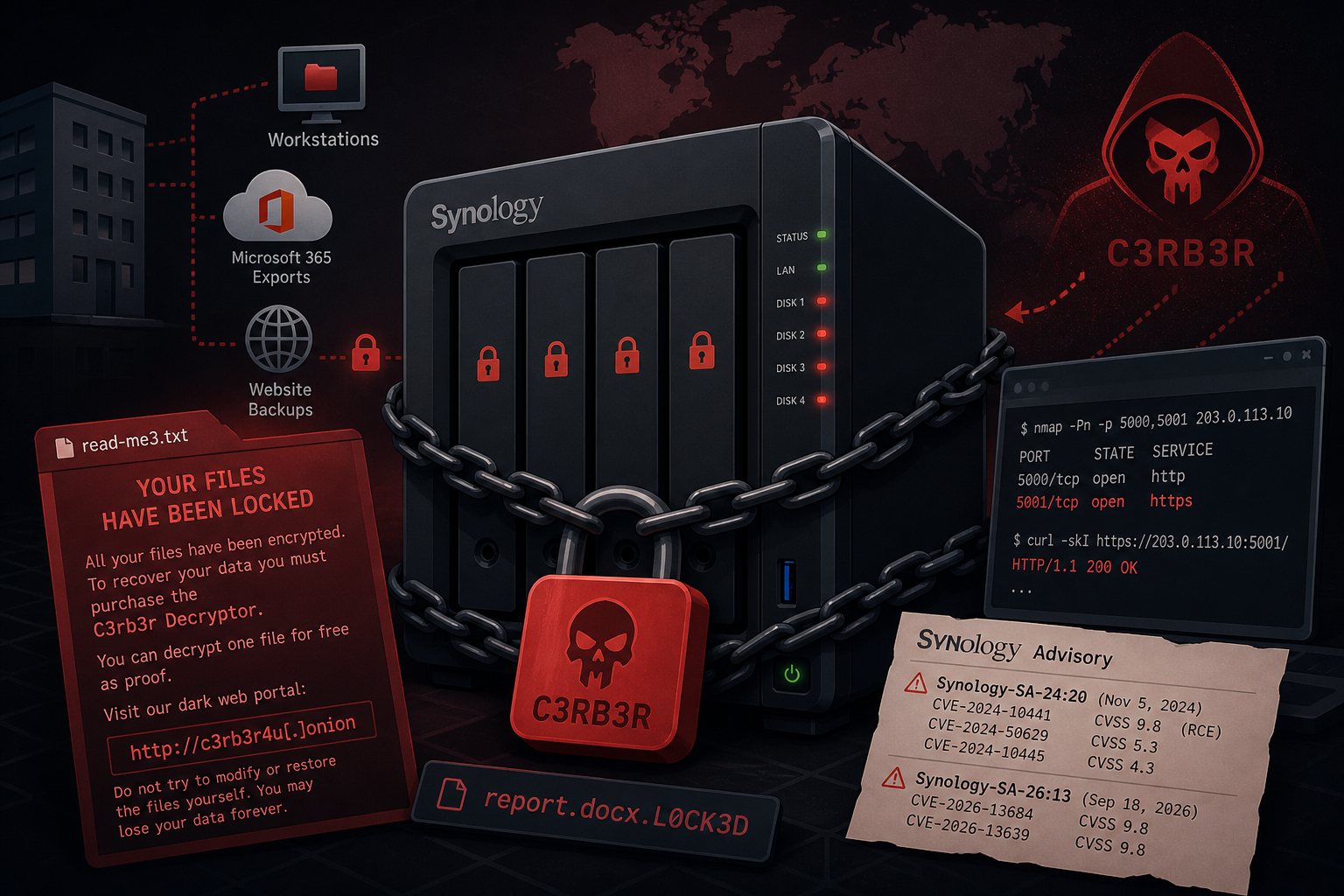
Synology published a statement on October 29, 2026 saying attackers are exploiting a DiskStation Manager (DSM) vulnerability "patched in December 2024" to encrypt data on NAS units running old firmware and demand a ransom. Owners posting since mid-October report files renamed with a .L0CK3D extension and a ransom note named read-me3.txt in every encrypted folder. According to BleepingComputer, the note sells a "C3rb3r Decryptor" through a dark web portal and offers to restore one file free as proof.
Small offices use Synology units as file servers and as the backup target for workstations, Microsoft 365 exports, and website backups. If the backup box is encrypted along with the shares it protects, nothing is left to restore.
Synology's statement points to advisory Synology-SA-24:20
Synology did not name a CVE. Its statement links to Synology-SA-24:20, published November 5, 2024 for bugs reported at Pwn2Own that year. The advisory covers three flaws:
- CVE-2024-10441 (CVSS 9.8): remote code execution in the system plugin daemon
- CVE-2024-50629 (CVSS 5.3): limited file read in the webapi component
- CVE-2024-10445 (CVSS 4.3): limited file write through the update function
The November 2024 advisory date does not match the December 2024 patch date in the statement, as BleepingComputer and The Hacker News both noted. When BleepingComputer asked which bug is in use, a Synology spokesperson referred it back to the same advisory. CVE-2024-10441 is the only one of the three rated critical and the only one that allows code execution, so most coverage treats it as the likely entry point. Synology has not confirmed that.
Qihoo 360 ties C3RB3R to two September 2026 DSM flaws
Qihoo 360's anti-ransomware team says it has handled multiple C3RB3R infections on Synology units since October and links them to two newer bugs: CVE-2026-13684, an output encoding flaw in DSM's SCGI component, and CVE-2026-13639, insufficient entropy in the DSM login logic. Both are rated 9.8 and let an unauthenticated remote attacker read or write arbitrary files. Synology fixed them on September 18, 2026 in Synology-SA-26:13, an advisory covering eight CVEs. Synology's advisory does not mention exploitation, and the company has not responded publicly to the 360 findings.
The C3RB3R name first appeared in December 2021 in attacks on Atlassian Confluence and GitLab servers, and it borrows from the Cerber ransomware-as-a-service operation that disappeared at the end of 2019.
DSM builds that fix both advisories
Because the exploited bug is unconfirmed, treat both advisories as live and update to the September fix or later. Check the installed version under Control Panel > Info Center > General and compare it to this list:
- DSM 7.4: 7.4-90075 or later
- DSM 7.3: 7.3.2-86009-4 or later
- DSM 7.2.2: 7.2.2-72806-9 or later
- DSM 7.2.1: 7.2.1-69057-12 or later
These builds are newer than the SA-24:20 fixes for the same branches (7.2.2-72806-1 and 7.2.1-69057-6), so one update closes both sets of bugs. Updates install from Control Panel > Update & Restore > DSM Update, where Synology also asks owners to turn on automatic updates.
Units on DSM 7.2, 7.1, or 6.2 are a harder case. SA-24:20 lists fixes for them (7.2-64570-4, 7.1.1-42962-7, and 6.2.4-25556-8), but SA-26:13 lists no fixed build for any of the three. Apply the 2024 fix, keep the unit off the internet entirely, and budget for a replacement.
Testing whether DSM answers from the internet
Besides patching, Synology and the coverage recommend blocking internet access to the DSM management interface. BleepingComputer, citing Shadowserver, counts more than 380,000 Synology NAS units exposed online, a count that may include patched units and honeypots. From a machine outside the office network, run these against the office's public IP:
nmap -Pn -p 5000,5001 203.0.113.10
curl -skI https://203.0.113.10:5001/
Ports 5000 and 5001 are DSM's default HTTP and HTTPS ports. An open port or any HTTP response means the login page is reachable. Remove the port forwards on the firewall, and turn off UPnP so the NAS cannot recreate them through the router configuration option under Control Panel > External Access. Check the QuickConnect setting in the same place: QuickConnect relays connections to DSM through Synology's servers without any port forward, so a closed nmap result does not prove the login page is private. Staff who need remote access should come in over a VPN.
Searching a volume for C3RB3R files
With SSH enabled, an administrator account can search for the ransom note and encrypted files:
sudo find /volume1 -name 'read-me3.txt' 2>/dev/null | head
sudo find /volume1 -name '*.L0CK3D' 2>/dev/null | wc -l
Repeat for /volume2 and any other volumes. A hit means the unit is compromised. Unplug its network cable, leave the disks as they are for investigation, and restore to clean hardware from a copy the NAS had no way to reach.
Keeping a backup copy the NAS cannot delete
A patched NAS still needs a copy of its data that a compromised admin account cannot touch. On Btrfs volumes, Snapshot Replication takes scheduled snapshots, and DSM 7.2 and later can mark them immutable so nobody, administrators included, can delete them before the retention period ends. Hyper Backup can send an encrypted copy offsite to a second NAS, to cloud storage with object lock enabled, or to USB drives that rotate offsite. Falcon Internet keeps backup storage for hosted servers off the public internet and tests restores from it quarterly. Pull a sample of files back from the offsite set on a schedule and open them.