WP-SHELLSTORM: Hacker's Open Server Exposed 25,000 Backdoored WordPress Sites
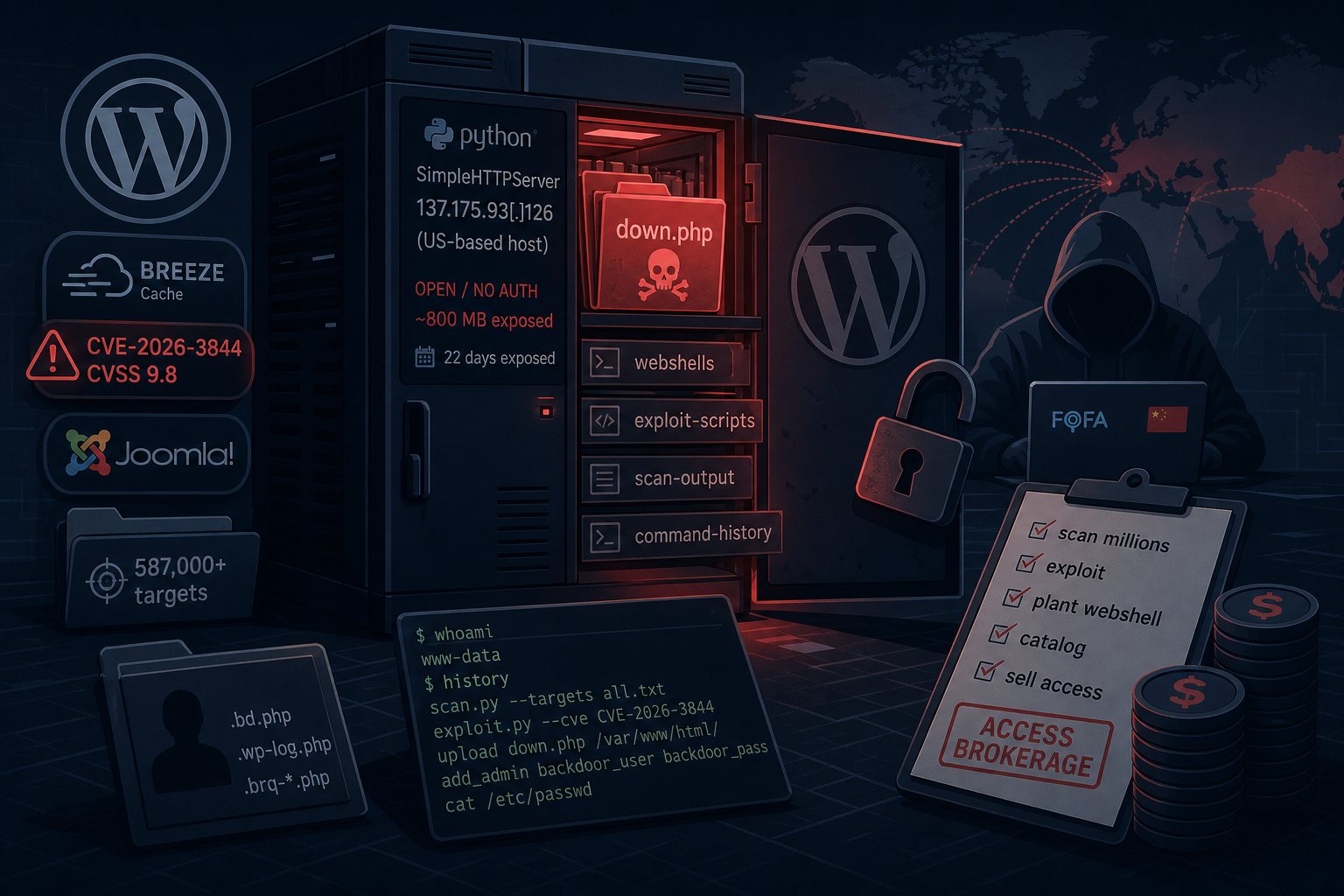
The crew behind WP-SHELLSTORM had a solid operation going: scan millions of sites, exploit unpatched plugins, plant a hidden webshell on every site that fell, and sell that access to whoever would pay. What they did not have was a locked door on their own server.
On June 11, 2026, SOCRadar’s threat intelligence team found an unauthenticated Python SimpleHTTPServer sitting open at 137.175.93[.]126 — a rented US-based host — with no password and roughly 800 MB of files available to anyone who looked. Inside: webshell payloads, automated exploit scripts, scan output sorted by target, and the operator’s own typed command history. The server had been publicly accessible for approximately 22 days. Ctrl-Alt-Intel independently discovered and analyzed the same exposed infrastructure, publishing their breakdown on June 22. By the time the broader security community wrote it up this week, researchers had a remarkably complete picture of an operation that rarely hands investigators anything so convenient.
Access Brokerage, Not Direct Extortion
WP-SHELLSTORM is not a ransomware gang. It’s a step earlier in the criminal supply chain: a webshell access brokerage. The model is industrial in its logic — break in at volume, install a backdoor, catalog the asset, sell the login. The buyers are ransomware groups, SEO spammers, phishing operators, and credential thieves who would rather purchase a guaranteed foothold than do the reconnaissance themselves.
That distinction matters for site owners. If your WordPress site ends up in their inventory, you don’t just have one threat actor to worry about. Once access is sold, the original compromise becomes the starting point for whoever buys it — and that party’s goals may be very different from the original attacker’s. A backdoor planted for $30 in access resale can become the entry point for a $60,000 ransom demand two months later.
How They Got In: CVE-2026-3844 Did Most of the Heavy Lifting
The attacker’s toolkit covered 27 known vulnerabilities, but one accounted for the overwhelming majority of successful compromises. CVE-2026-3844 is a CVSS 9.8 unauthenticated arbitrary file upload flaw in the Breeze Cache plugin — the caching plugin bundled with Cloudways-hosted WordPress sites — affecting all versions through 2.4.4. The vulnerability lives in the plugin’s fetch_gravatar_from_remote function, which retrieves Gravatar images from remote URLs and saves them locally. Because the function performed no validation on what it was actually saving, an attacker could craft a request that drops a PHP webshell onto the server instead of a profile image. No authentication required.
One important caveat: the vulnerable code path is only reachable when the “Host Files Locally – Gravatars” add-on is enabled, and that option is off by default. Not every Breeze install was exposed. Still, attackers launched the exploit against more than 45,000 targets and logged over 17,000 successful webshell deployments — meaning a significant share of Breeze installs had that option turned on. Cloudways patched the flaw in Breeze 2.4.5. If you haven’t updated, do it now.
Other active CVEs in the toolkit: CVE-2026-48907 in the Joomla JCE Editor (rated maximum severity and already on CISA’s Known Exploited Vulnerabilities catalog), CVE-2026-1969 in ThemeREX Addons, long-patched flaws in Simple File List, and several other WordPress plugin vulnerabilities that still work because updates were never applied. The 587,000 Joomla installations flagged in the attacker’s target lists show this isn’t purely a WordPress problem — anything running unpatched CMS plugins was fair game.
The Webshell and What It Left Behind
Once planted, the primary backdoor — a PHP file named down.php — sits quietly and waits for instructions. Researchers found it obfuscated in four layers, derived from BestShell, a Chinese open-source webshell. Variant filenames in the attacker’s logs included .bd.php, .wp-log.php, and files matching .brq-*.php. For persistence on compromised Linux hosts, attackers deployed VShell, a full remote-access tool disguised as the kernel process [kworker/0:2] — a name most monitoring tools won’t flag as suspicious.
Researchers assessed with medium-to-high confidence that the operator is Chinese or Chinese-speaking: Simplified Chinese appears throughout the toolkit, and the infrastructure reconnaissance relied on FOFA, a Chinese internet-search platform common in that threat actor community. The operation reads as financially motivated cybercrime rather than state-sponsored activity.
Before the WordPress campaign, the same crew ran a parallel operation in May 2026 targeting corporate Java applications — fintech, e-commerce, and logistics companies — via CVE-2021-29441 in Nacos configuration servers, pulling cloud credentials for AWS, Alibaba, Oracle, Tencent, and DigitalOcean. They’re not specialists; they’re opportunists with a tested toolkit.
What to Check Right Now
After deduplication, Ctrl-Alt-Intel confirmed roughly 25,195 compromised sites; SOCRadar observed more than 5,700 active webshells at the time of analysis. If you’re running WordPress or Joomla, these are the immediate actions:
- Update Breeze Cache to 2.4.5 immediately if your site uses it, and confirm whether the “Host Files Locally – Gravatars” setting was ever enabled.
- Audit every installed plugin and theme for pending updates. The toolkit exploited 27 CVEs — the common thread across virtually all of them is that patches existed and weren’t applied.
- Scan for webshell artifacts: look for files named
down.php,.bd.php,.wp-log.php, and any files matching.brq-*.phpin your web root and plugin directories. File integrity monitoring tools like Wordfence or iThemes Security can catch unauthorized additions. - Review your admin user list for accounts you didn’t create — webshell operators frequently add backdoor admin accounts as a secondary persistence mechanism.
- Check server logs for requests to
down.phpor any.phpfile in a location where PHP files don’t belong (upload directories, cache folders, image directories). - Remove plugins and themes you’re not actively using. An inactive plugin you forgot about is still an exploitable vulnerability if it hasn’t been updated.
The 22 days this server sat open handed researchers an unusually detailed window into how access brokerage operations actually run. The operational security failure was the attacker’s — but the 25,000 sites in their inventory didn’t get a say in the matter. Keeping your plugin inventory current is the straightforward preventive; incident response after the fact is considerably more expensive, which is why backup integrity and clean restore capabilities are tested at Falcon Internet as a matter of routine.