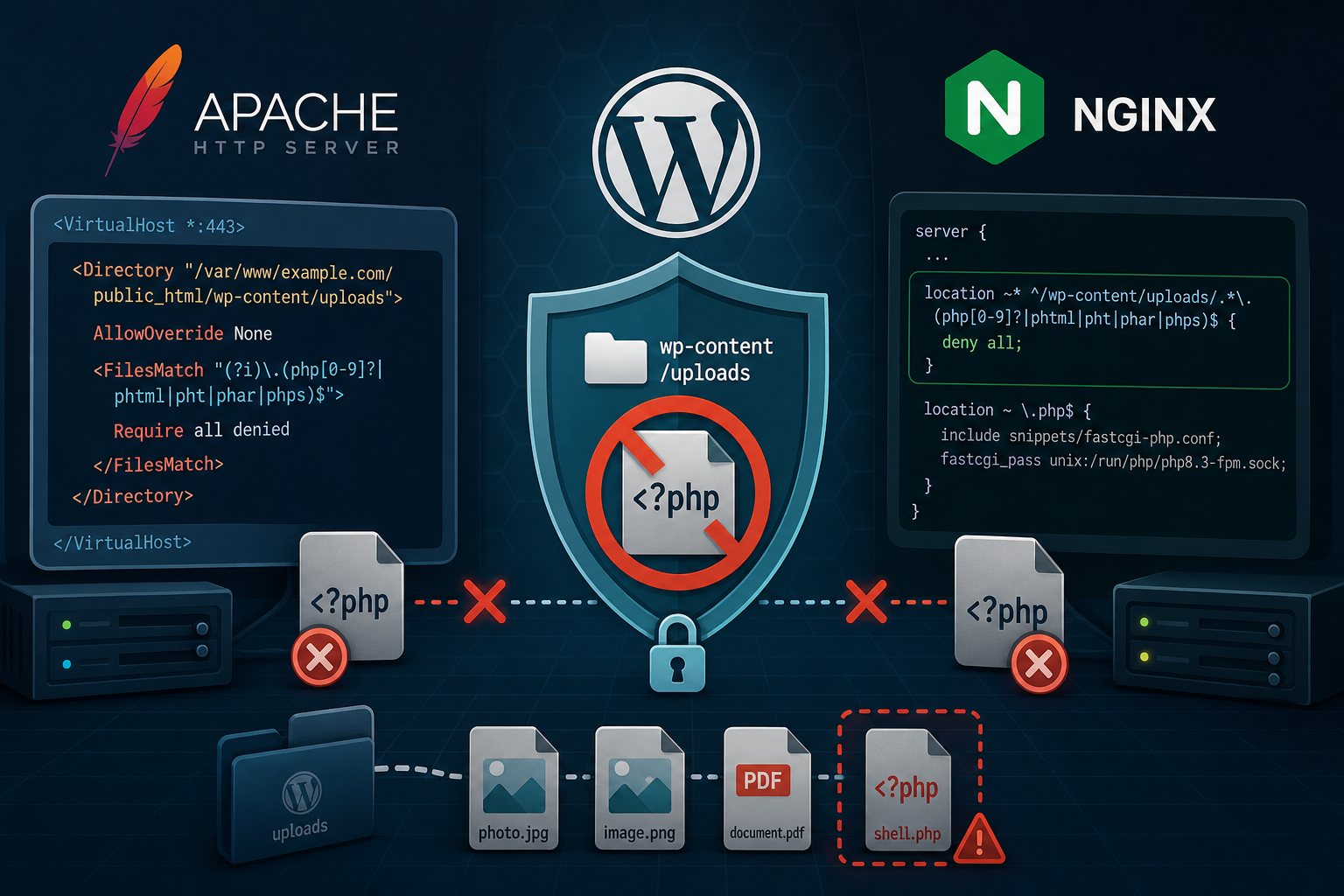
Block PHP execution in WordPress uploads on Apache and Nginx
On November 13, CVE records were published for three WordPress plugins that let an unauthenticated visitor upload a file ending in .php and then run it: Chatterbug Forms through 1.0.2 (CVE-2026-125055, CVSS 9.8, reported by Wordfence), Advance Guest Post through 1.9 (CVE-2026-118063) and Ahime Image Printer through 1.0.0 (CVE-2026-124833), the last two reported through WPScan. In October, Patchstack logged attackers using CVE-2026-85097 in Bricksforge through 3.1.8.9 starting October 7, the day it was disclosed. That flaw uses a GIF/PHP polyglot file and a forged .php URL to get code onto the server. Bricksforge fixed it in 3.1.8.10 and 4.0.0.
Each of these needs two things to become remote code execution: a PHP file in a web-reachable directory, and a web server willing to hand that file to PHP. You can't patch plugins before their authors do, but you can make the second condition false. The WPScan record for Advance Guest Post says so directly: the upload "can lead to remote code execution depending on the server configuration."
WordPress puts media uploads under wp-content/uploads, and a stock install never runs PHP from there. Denying PHP in that tree costs nothing on a normal site. The steps below cover Apache 2.4 with PHP-FPM, shared hosting where you only have .htaccess, and Nginx. Paths assume a document root of /var/www/example.com/public_html.
Look for PHP files already sitting in uploads
Run this before you change anything. A block hides existing web shells from the web, but it doesn't remove them, and you want to know if the site is already compromised.
cd /var/www/example.com/public_html
find wp-content/uploads -type f \( -iname '*.php*' -o -iname '*.phtml' -o -iname '*.phar' -o -iname '.htaccess' -o -iname '.user.ini' \) -ls
grep -rl '<?php' wp-content/uploads
The *.php* pattern also catches double extensions such as photo.php.jpg. The grep finds PHP hidden inside files with image extensions, which is how polyglot uploads look on disk. Some plugins leave an empty index.php in their upload folders to stop directory listing. Those files contain only a comment. Anything with eval, base64_decode, assert or system calls should be treated as an incident.
Read every .htaccess file the search found, because the Apache change below stops them from loading and any legitimate rule in them has to move into the vhost. WooCommerce, for example, protects downloadable products with wp-content/uploads/woocommerce_uploads/.htaccess.
Apache 2.4: deny PHP in the vhost and disable overrides
First see which extensions your server sends to PHP:
grep -RniE 'FilesMatch|SetHandler|AddHandler|AddType.*php' /etc/apache2 /etc/httpd 2>/dev/nullDebian and Ubuntu's packaged php8.x-fpm.conf matches ".+\.ph(?:ar|p|tml)$", so .phar, .php and .phtml all run. If you find an AddHandler line for PHP, replace it. AddHandler matches an extension anywhere in the filename, so photo.php.jpg runs as PHP.
Add this inside the site's <VirtualHost> block:
<Directory "/var/www/example.com/public_html/wp-content/uploads">
    AllowOverride None
    <FilesMatch "(?i)\.(php[0-9]?|phtml|pht|phar|phps)$">
        Require all denied
    </FilesMatch>
</Directory>

# Only needed if WooCommerce is installed. AllowOverride None
# stops Apache reading the .htaccess that protected this folder.
<Directory "/var/www/example.com/public_html/wp-content/uploads/woocommerce_uploads">
    Require all denied
</Directory>
AllowOverride None does the important work here. A plugin flaw that accepts any filename can also write a .htaccess into uploads/2026/11/ that maps .jpg to the PHP handler. Apache merges <Directory> sections and .htaccess files from the shortest path to the longest, so a file deeper in the tree overrides yours. With overrides off, Apache never reads it.
Go back to your .htaccess list and copy each legitimate rule into a matching <Directory> block, as with WooCommerce above. Then test and reload:
apachectl configtest && systemctl reload apache2 # httpd on RHEL/AlmaLinuxUse Require all denied. The old Order deny,allow and Deny from all lines only work when mod_access_compat is loaded.
Shared hosting with only .htaccess access
Create wp-content/uploads/.htaccess:
<FilesMatch "(?i)\.(php[0-9]?|phtml|pht|phar|phps)$">
    Require all denied
</FilesMatch>
This stops a plain .php upload, but an attacker who can write a .htaccess one directory deeper can still undo it. Ask your host whether they set a server-level rule for uploads.
Many older guides suggest php_flag engine off. That directive only exists when PHP runs as mod_php. On PHP-FPM, which most current servers use, Apache doesn't recognize it and every request under that directory returns a 500 error. LiteSpeed Web Server Enterprise reads Apache .htaccess files, but its directive support isn't identical to Apache's, so run the curl tests below on LiteSpeed too.
Nginx: put a deny location ahead of the PHP handler
Nginx checks regular expression locations in the order they appear in the file and uses the first match. A typical WordPress server block has location ~ \.php$ passing requests to PHP-FPM. Your deny rule must come before it:
server {
    # ...

    location ~* ^/wp-content/uploads/.*\.(php[0-9]?|phtml|pht|phar|phps)$ {
        deny all;
    }

    location ~ \.php$ {
        include snippets/fastcgi-php.conf;
        fastcgi_pass unix:/run/php/php8.3-fpm.sock;
    }
}
The pattern also matches path-info tricks like /wp-content/uploads/evil.gif/x.php, where a loose FastCGI setup would run evil.gif as a script. Multisite uploads under uploads/sites/N/ are covered because the regex matches anything below uploads.
Avoid the other common answer, location ^~ /wp-content/uploads/. It works, but it stops Nginx checking every regex location for that path, including your static-file expires and cache-header rules, so images can quietly lose their caching headers.
Nginx ignores .htaccess, so if WooCommerce stores downloads on the site, add:
location ^~ /wp-content/uploads/woocommerce_uploads/ {
    deny all;
}
Then:
nginx -t && systemctl reload nginxValidate with curl
Put harmless test files in place and request them from outside the server:
cd /var/www/example.com/public_html/wp-content/uploads
for ext in php PHP phtml php5 phar; do
    echo '<?php echo "EXECUTED";' > "uploadtest.$ext"
    printf '%s ' "$ext"
    curl -s -o /dev/null -w '%{http_code}\n' "https://example.com/wp-content/uploads/uploadtest.$ext"
done
rm -f uploadtest.*
Every line should print 403. A 200 means the rule isn't applying. Fetch that file without -o /dev/null. If the body says EXECUTED, PHP is running from uploads. If it shows the source code, PHP isn't running but your files can be downloaded, so fix the pattern anyway. Also check one real image from the media library, which should still return 200. If a CDN or caching proxy sits in front of the site, test both the public hostname and the origin directly.
Plugins that keep code under uploads
A few plugins write PHP files into uploads and expect them to run. Page builders and caching plugins generate CSS and JavaScript there, which the rule doesn't touch, but an occasional plugin serves a PHP endpoint from its upload folder. If something breaks after the change, check the web server error log for a 403 on a path under uploads. Then either allow that one exact filename in its own block, or replace the plugin. Don't loosen the pattern for the whole tree.
Attacks this rule does not stop
- Plugins that write files outside
uploads, into their own directory or the web root. A plugin that lets visitors choose the destination path gets around the block. - Arbitrary file deletion. CVE-2026-124822 in Easy DragDrop File Uploader, published the same day, lets an unauthenticated visitor delete files, and deleting
wp-config.phpsends many sites back into the installer. - Uploaded HTML and SVG files that carry JavaScript. Those are a cross-site scripting problem, and blocking PHP does nothing for them.
- Any of the vulnerable plugins listed above, which still need to be updated or removed. Check
wp plugin list --fields=name,version,updateagainst the advisories.